Deloitte Surveyed 1,326 CFOs on AI. I Rebuilt the Demo as 4 Prompts You Can Run.
Deloitte's AI-in-finance demo showed four use cases running inside Fortune 500 teams. I rebuilt the finance core of that engagement as four skills our AI Finance Chief of Staff runs, and I'm giving you the prompts to run them on your own numbers.
I watched the Snowflake and Deloitte webinar on AI in finance a few weeks ago, and one thing stuck with me.
Deloitte surveyed 1,326 finance leaders to write the report behind it. The demo on the call showed four finance use cases that are being deployed right now inside Fortune 500 teams. Real ones, on real numbers.
And watching it, I kept thinking about everyone who isn't a Fortune 500. The mid-market CFO who needs the same thing and doesn't have a seven-figure budget to get it.
You've basically got two options there. You could drop something like a quarter of a million dollars on an engagement and have a Big Four firm build it for you. Or you get it built another way.
So I rebuilt the finance core of that engagement as four skills our AI Finance Chief of Staff runs. Same four jobs the demo showed. The difference is that on your numbers, every figure traces back to a query you can check.
Below I'll walk through all four, show you ours running on a sample CPA firm, and give you the actual prompt for each one so you can run it on your own numbers today. There's a free pack with all four at the bottom.
Let's get into it.
1. Explain the Numbers
This is the one people underestimate. You don't want another dashboard. You want to ask a plain question and get an answer.
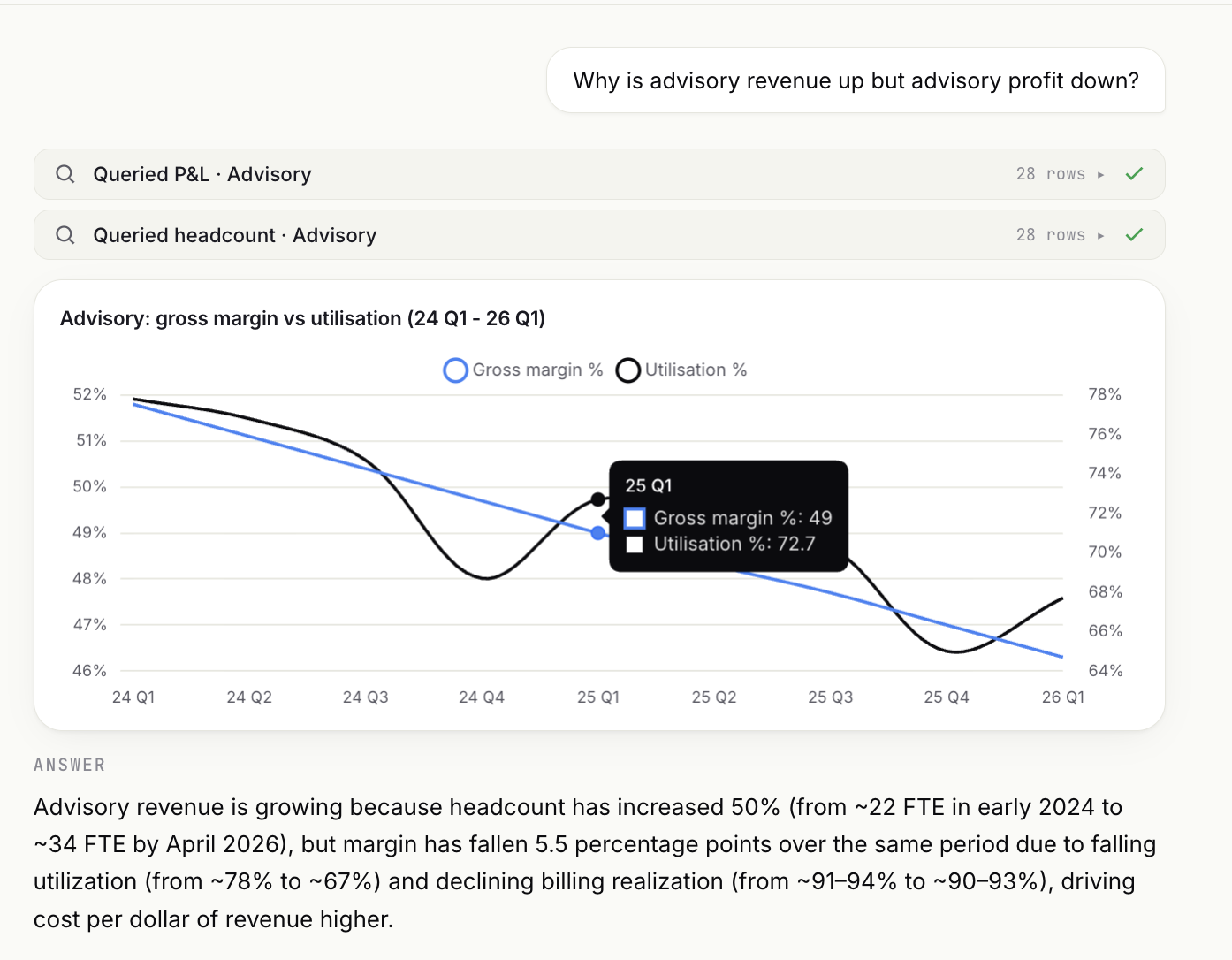
Here's the question I gave ours: why is advisory revenue up but profit down? In a few seconds it came back with the cause, not the symptom. Headcount grew faster than demand, utilization dropped, and advisory margin fell from 52% to 44%. So it isn't a sales problem. It's a capacity problem.
That's the whole point. A dashboard shows you the margin fell. This tells you why, and it cites the figures it used so you can check them.
The prompt below does the same job on your P&L. Paste your numbers under it and ask your question.
Paste under it: your P&L by month (revenue, cost, margin) for the last 12 to 24 months, plus headcount or utilization by team if you have it.
You are my finance analyst. I'm going to ask a question about my numbers, and I want a diagnosis in plain English — what changed and why — not a summary of the data.

HARD RULE: Use only the numbers I paste below. Do not state, add, or calculate any figure that isn't in the data I give you. If you need a number I didn't provide to answer well, stop and ask me for it instead of estimating.

Answer in this exact structure:

ANSWER
One or two sentences. Plain English. The cause, not the symptom.

SUPPORTING NUMBERS
- 3 to 6 bullets. Each one cites a specific figure from my data and the period it covers.

NEXT QUESTION
One sharp follow-up question I should ask next.

My question: [WRITE YOUR QUESTION — e.g. "Why is advisory revenue up but profit down?"]

My numbers:
[PASTE YOUR P&L / HEADCOUNT DATA AS CSV OR A TABLE]
2. Spot the Risk
The risks that hurt you are the ones hiding under a good headline number. The firm looks fine at the top, so nobody goes looking.
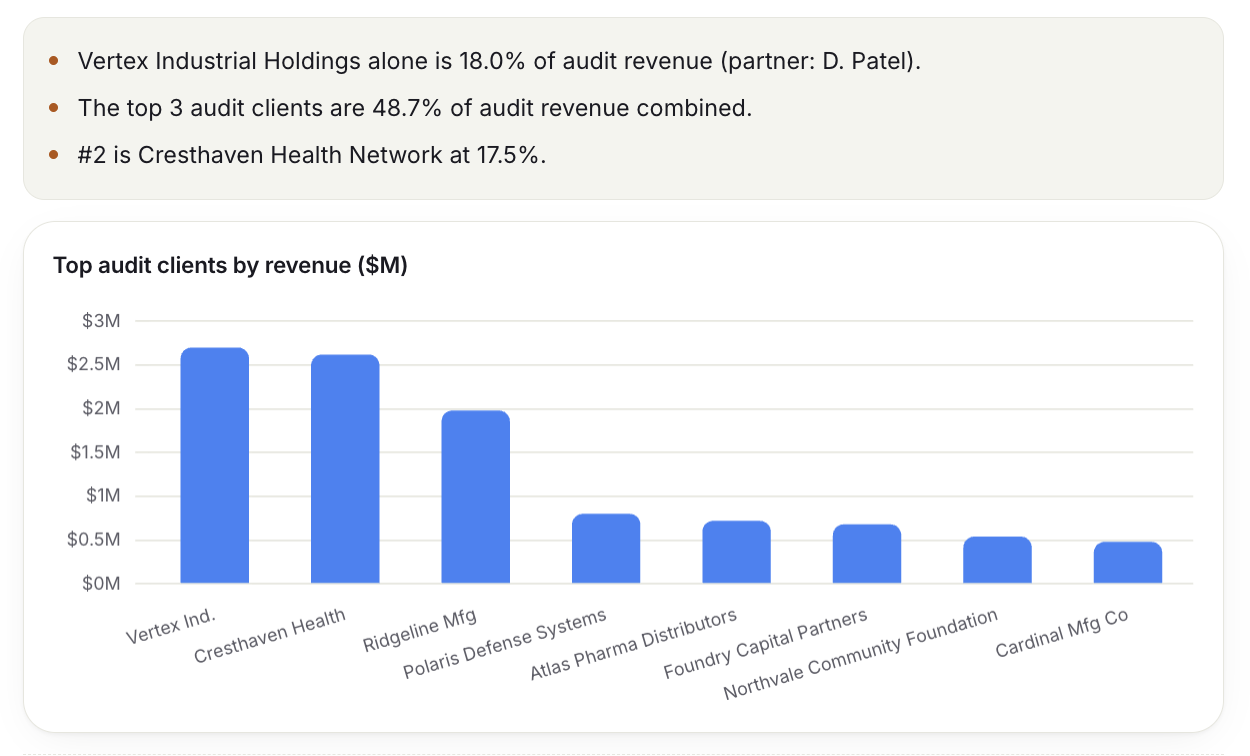
When I ran the scan on the sample firm, it surfaced two of those. One client had quietly grown into too large a share of the book. And advisory collections had stretched from 47 days to 68, while a fast-paying tax line kept the firm-level number looking healthy.
Neither of those shows up if you only read the summary. That's what a risk monitor is for. It ranks what's getting worse, tells you why the top-line view hides it, and points at who should own it.
This prompt runs that scan on your aging and your client revenue.
Paste under it: AR aging by client or by service line, revenue by client (top 10 to 20), and DSO by service line if you track it.
You are my risk monitor. Look at the numbers I paste below and surface the risks that are quietly getting worse — the ones a healthy firm-level number would hide.

HARD RULE: Use only the figures I give you. Do not invent, estimate, or calculate any number that isn't in my data. If a risk looks possible but you'd need a number I didn't provide to confirm it, say so and tell me what to pull.

Rank the findings by severity. For each one, give me:
- What is quietly getting worse
- Why the headline or firm-level view hides it
- Who on my team should own it
- The single sharpest question I should ask about it
- Whether it belongs in the board risk section (yes/no)

Plain English. No consultant jargon.

My numbers:
[PASTE AR AGING, REVENUE BY CLIENT, DSO BY SERVICE LINE]
3. Scenario Forecast
Most forecasting questions are really one decision wearing a spreadsheet. Can we afford this move without breaking something.
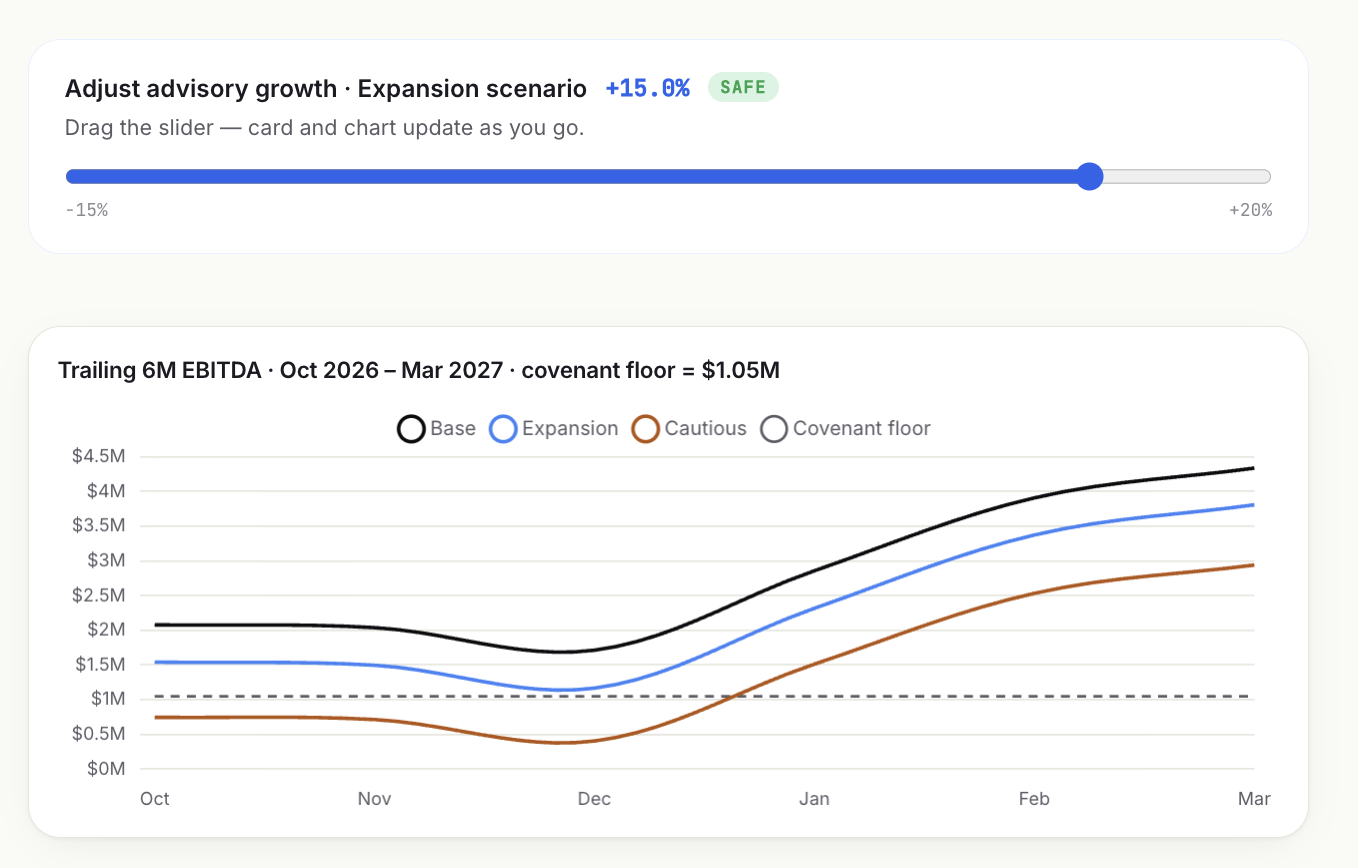
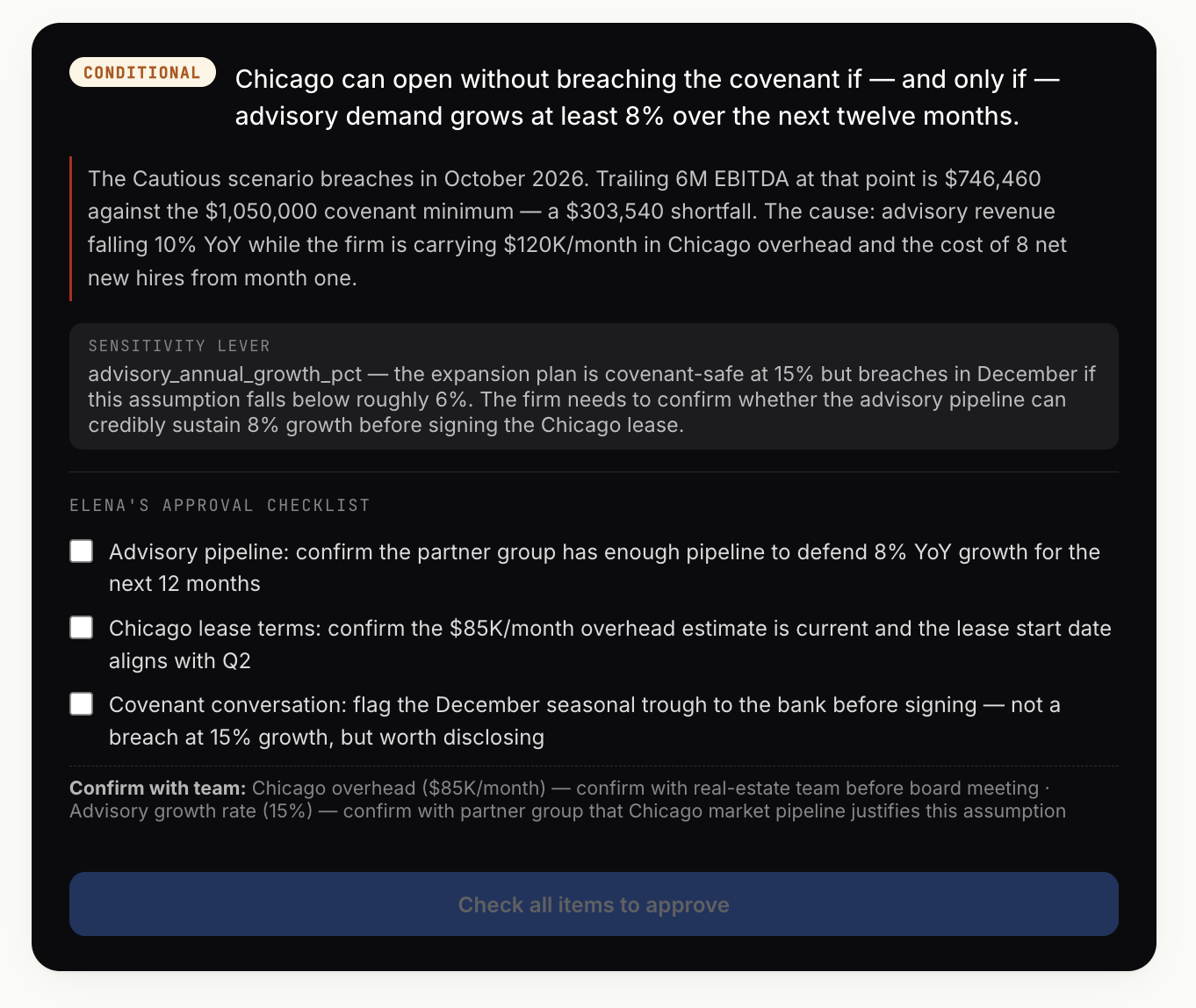
I asked ours a real one: can the firm open a second office next quarter without breaching the bank covenant? It built three futures, base, expansion, and cautious, and drew each one against the covenant line. Then it did the useful thing. It named the single assumption the whole decision hangs on, so you know exactly which number to pressure-test before you take it to the CEO.
That last part is what turns a forecast into a decision. Three numbers are easy. Knowing which one matters is the job.
The prompt walks your numbers through the same three scenarios and the covenant check.
Paste under it: trailing 12-month revenue and costs, current cash and debt, your covenant terms, and the cost of the decision you're weighing.
You are my scenario forecaster. I have a decision to make. Build three 12-month scenarios — base, expansion, and cautious — and tell me what each one means for the decision.

HARD RULE: Every number you use must trace back to the data I paste below or a clearly-stated assumption I can change. Do not invent figures. When you make an assumption, label it as an assumption and show the number you used so I can adjust it.

For each scenario give me:
- The 12-month outcome (revenue, cost, profit, ending cash)
- Where it lands against my covenant — does it breach, and by how much
- The key risk

Then, at the end:
- THE ONE ASSUMPTION this decision hangs on, and how sensitive the answer is to it
- What I should approve, change, or flag before this goes to the CEO or board

Plain English. One clear sentence beats a paragraph.

The decision: [DESCRIBE IT — e.g. "Open a second office in Q2 at a cost of $X"]

My numbers and covenant terms:
[PASTE TRAILING REVENUE/COSTS, CASH, DEBT, COVENANT TERMS]
4. Board Question Prep
You already know the board is going to ask the hard question. The work is having the number ready before you walk in.
Once the expansion decision was approved, I had ours prep the board meeting. It gave back the five questions the board was most likely to ask, ordered by likelihood, each with a tight talking point grounded in a real figure. It also flagged the points where I shouldn't overcommit, because the data didn't fully back them yet.
That's the difference between walking in hoping and walking in ready.
This prompt does it from whatever decision you're bringing to your board.
Paste under it: the decision or result you're bringing to the board, plus the key numbers behind it (the forecast from Prompt 3 works well here).
You are prepping me for a board meeting. Based on the decision and numbers below, give me the five questions the board is most likely to ask — ordered from most likely to least likely — and a precise answer for each.

HARD RULE: Every talking point must cite a specific figure or percentage from the data I paste below. Do not invent numbers. If a likely question can't be answered from my data, list it separately and tell me what I need to bring.

For each question give me:
- The question
- A talking point of 2 to 3 sentences, grounded in a real number
- An "avoid" note — the thing I should not overcommit to on this point

Concise enough to use in the room.

The decision / result I'm presenting:
[DESCRIBE IT]

The numbers behind it:
[PASTE THE FORECAST OR KEY FIGURES]
The honest part
I want to be straight about what these prompts will and won't do.
Run on your own numbers, they'll give you real answers today. You get a plain-English diagnosis of what moved, a scan for the risk you'd miss, a scenario you can pressure-test, and a board prep. That's genuinely useful, and it's free.
What a prompt can't do on its own is guarantee every figure is right. In the live build, the assistant doesn't do the math. Code pulls the numbers from your actual data and the assistant only explains them, so it can't quietly invent a figure. A raw prompt can't enforce that, which is why each one carries a hard rule telling it to use only the numbers you give it and to ask when it needs one you didn't.
Keep that line in. It's the difference between a useful answer and a confident wrong one. And it's the one real gap between the pack and the build.
Get the Prompt Pack
All four prompts are in one file you can download, keep, and paste straight into Claude or ChatGPT. No email needed.
The AI Finance Chief of Staff — Prompt Pack
All four prompts in one file. Paste straight into Claude or ChatGPT. No email needed.
If you'd rather see it run on your real numbers, with every figure traced back to a query you can check, that's the build. I'll do one for your firm free. Details are at the bottom.
Frequently Asked Questions
What were the four AI finance use cases in the Deloitte demo?
Explaining the numbers (a plain-English diagnosis of what changed and why), risk monitoring (surfacing risks hiding under good headline numbers), scenario forecasting (modeling a decision against a covenant), and board question prep (anticipating board questions with grounded answers). The Deloitte study behind the webinar surveyed 1,326 finance leaders.
Can I run these AI finance prompts on my own numbers?
Yes. Each prompt is written to run in Claude or ChatGPT on a CSV export from your accounting system. Paste the prompt, paste your numbers, and send. The free Prompt Pack contains all four.
How do you stop the AI from inventing a number?
Each prompt carries a hard rule telling the assistant to use only the figures you provide and to ask for anything missing rather than guess. In the full build, code computes the numbers from your real data and the assistant only explains them, so it can't invent a figure at all.
What's the difference between the prompts and the full build?
The prompts are the do-it-yourself version and they give real answers today. The build wires the assistant to your live data so every figure is computed, not guessed, and traces back to a query you can check. Lead Phoenix AI builds one for your firm free.